
Free Revit Viewer: 4 Ways to Open RVT Files in 2026
Free Revit Viewer: 4 Ways to Open RVT Files in 2026
QUICK SUMMARY
- Goal: Review an RVT model without buying an extra Revit authoring licence just to view it.
- Workflow: Choose a viewing route → check access → open the model → review the right information.
- Benefits: Spend less time forwarding files, match the tool to the format, and control data-sharing risk.
What does “free Revit viewer” really mean?
When people search for a free Revit viewer, they often want to open an .RVT file, inspect a floor or service zone, take a quick measurement, and send design feedback. That is a review workflow—not the same as authoring or changing the underlying model. It is also important to distinguish direct RVT viewing from viewing a published link or an IFC export.
As of November 5, 2026, Autodesk lists RVT among the formats supported by Autodesk Viewer. A material change for project teams is that Revit 2027 no longer provides Viewer Mode.
4 ways to open RVT files for free
1. Autodesk Viewer: open an RVT file in your browser
Autodesk Viewer is a sensible starting point if you have an RVT file but no Revit installation. Autodesk describes a browser-based service for viewing, measuring, marking up and sharing numerous 2D/3D formats. Its format list includes RVT files created with Revit 2015 or later. A connection, account sign-in and upload workflow may be required.
- Best for: project reviewers, coordinators and stakeholders who need model context without authoring tools.
- Check first: whether project policy allows uploading the file, and whether its format/version is supported.
2. Shared Views: request comments on one published view
When an authoring team has Revit and wants feedback on a specific part of the project, Shared Views can create a link to a visual representation of the active view. It is not the same as sending the complete RVT file. Autodesk's published workflow notes that the recipient can forward the link. Creating shared views requires a legitimate Revit environment: the entire publishing workflow should not be described as licence-free.
- Best for: a quick owner/client decision about a defined view.
- Check first: exactly what the view reveals and who is permitted to receive the link.
3. IFC viewer: use an open exchange file
If the handover is an .IFC file rather than an RVT, use a viewer that supports IFC. IFC as the open, vendor-neutral standard ISO 16739-1:2024 for exchanging BIM data. This route works well when different disciplines use different platforms or a project specifies an openBIM deliverable.
Important: an IFC viewer does not automatically open native RVT. Someone with the appropriate permissions and software must create the export first. Review floors, object identities, geometry and required attributes after conversion.
4. Revit 2026 Viewer Mode: a legacy option, not a 2027 solution
If your workstation already runs Revit 2026 or an earlier version, Autodesk documented Viewer Mode for opening and printing projects without an active software licence. Saving changes is blocked; export and print functions have important restrictions after modifying the model. See the official Revit 2026 documentation. Autodesk removed the mode beginning with Revit 2027, so it should not anchor a new team-wide viewing standard.
Another option: VinaBIM — free Revit viewing software
VinaBIM is standalone BIM software that opens Revit RVT, RFA and RTE files directly without requiring Autodesk Revit to be installed. It supports 3D views, floor plans, elevations, sections, element properties, Visibility/Graphics and Section Box for everyday model inspection.
VinaBIM currently provides its released Revit viewing features free of charge, according to the product team. Viewing and inspecting a model should not be confused with editing its original Revit geometry.
Explore VinaBIM on its official website
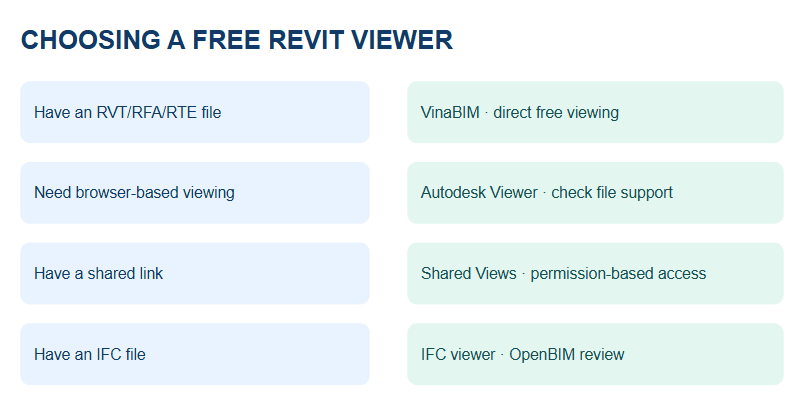
Comparison: which viewer fits your task?
Route | Input | Best use | Main limitation |
|---|---|---|---|
| Autodesk Viewer | Uploaded RVT | Browser review, measurement and markup | Internet, file-sharing approval |
| Shared Views | View link from Revit | Feedback on a particular view | Publishing requires Revit; link can be forwarded |
| IFC viewer | IFC export | Cross-platform model review | Not a direct RVT reader by default |
| Viewer Mode ≤ 2026 | Installed Revit | Legacy read-only review | Removed in Revit 2027 |
| VinaBIM (software) | Direct RVT / RFA / RTE | 2D/3D viewing and property inspection; currently free | Not the same as native model editing |
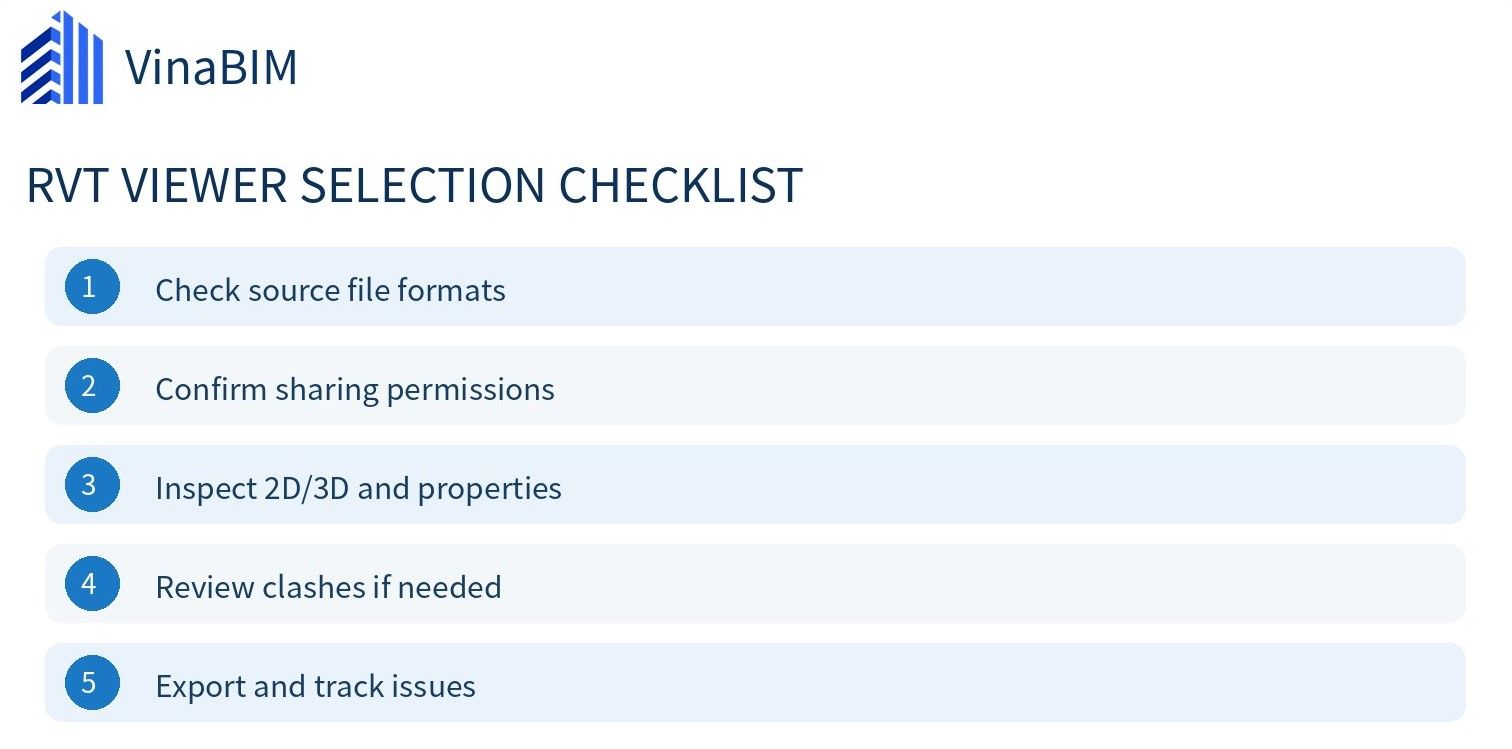
A five-step workflow for a useful, safer RVT review
Step 1 — Identify what you received
Is the deliverable RVT, IFC or a Shared Views link? A tool that only handles IFC will not solve direct RVT viewing unless an export is provided.
Step 2 — Confirm permission to use and share the data
Review project rules before uploading tender documents, sensitive MEP models or private client data. Set expectations about forwarding links, access duration and recipients.
Step 3 — Check version and model scope
Verify issue date, model revision, disciplines, levels and the expected building areas. Recheck the service's current file-format list if you are using a browser viewer.
Step 4 — Inspect geometry and capture precise feedback
Pick representative high-risk areas: circulation cores, risers and architecture/structure/MEP interfaces. A useful comment records a location, an observation and a question or requested action.
Step 5 — Maintain a traceable issue log
Move comments into a simple register with model revision, element or location, owner, due date and status. A viewer helps people see the problem; an issue workflow helps them close it.
Four mistakes to avoid
- Equating review with editing: opening RVT does not grant native model authoring.
- Treating IFC as RVT: export and translation checks still matter.
- Following outdated Viewer Mode guides: instructions for 2026 do not apply to Revit 2027.
- Uploading or forwarding without approval: check confidentiality, access and data scope first.
If your organization is choosing broader BIM software, frame the decision around the actual workflow—viewing, markup, revision control or design authoring—instead of simply comparing feature counts. Explore the broader VinaBIM direction at VinaBIM.
VinaBIM – Free Revit File Viewer
VinaBIM is a BIM software that allows users to open Revit file formats such as RVT, RFA, and RTE directly without installing Autodesk Revit. Users can view 3D models, floor plans, elevations, sections, and access component properties.
These model viewing features are currently available for free with VinaBIM, making it a suitable solution for engineers, architects, and companies that need to review and access Revit models in their daily workflows.
Try VinaBIM for free: https://vina-bim.com/en
Conclusion
The four established viewing routes serve different situations: Autodesk Viewer for supported uploaded RVT files, Shared Views for shared links, IFC viewers for IFC exports, and Viewer Mode for older Revit installations that still support it. In addition, VinaBIM is standalone software for viewing RVT/RFA/RTE files directly, with currently free viewing features.
View Revit files for free with VinaBIM
Need to inspect an RVT, RFA or RTE model without installing Revit? Discover VinaBIM for free Revit model viewing, 2D/3D inspection and property lookup.
FAQ — Frequently asked questions
Can I open RVT without installing Revit?
Yes, Autodesk Viewer supports RVT files in the browser, subject to supported versions, upload permissions and applicable service conditions.
Is Viewer Mode still available in Revit 2027?
No. Autodesk states that Viewer Mode has been removed beginning with Revit 2027; it remains documented for Revit 2026 and earlier.
Does Navisworks Freedom directly open native RVT?
Do not assume so. Autodesk points to an exported .NWD for Navisworks Freedom; use Autodesk Viewer for the browser-based native-RVT route.
Can an IFC viewer replace Revit for editing?
No. IFC is valuable for model exchange and review, but native authoring and deliverable production still call for tools designed for those tasks.
Is VinaBIM free for viewing Revit files?
Yes. VinaBIM currently offers free direct viewing of RVT, RFA and RTE files, including 2D/3D views and element property inspection. This does not imply that native Revit geometry editing is available.