
BIM Software for Model Coordination: A Practical 6-Step Clash Review
BIM Software for Model Coordination: A Practical 6-Step Clash Review
When architectural, structural, and MEP models evolve in parallel, the ability to open a file is only the starting point. Teams also need to know which revision is being reviewed, which clashes warrant action, and who will verify each fix. This is where BIM software contributes to a repeatable coordination workflow.

QUICK SUMMARY
- Goal: surface meaningful design conflicts early enough for discipline teams to coordinate a response.
- Workflow: prepare models → define checks → validate clashes → share BCF/CSV issues → recheck updates.
- Benefits: clearer context, better issue ownership, and fewer overlooked coordination decisions.
Why choose the workflow before choosing BIM software?
A geometric intersection is not automatically a design defect. It might be an approved penetration, an intentional interface, or a discrepancy caused by mismatched revisions. Engineers must evaluate each result against drawings, design requirements, and discipline responsibilities.
A useful coordination loop links viewing → checking → triage → assignment → verification. Software that reviews clashes does not necessarily replace the authoring tools used to modify design geometry.
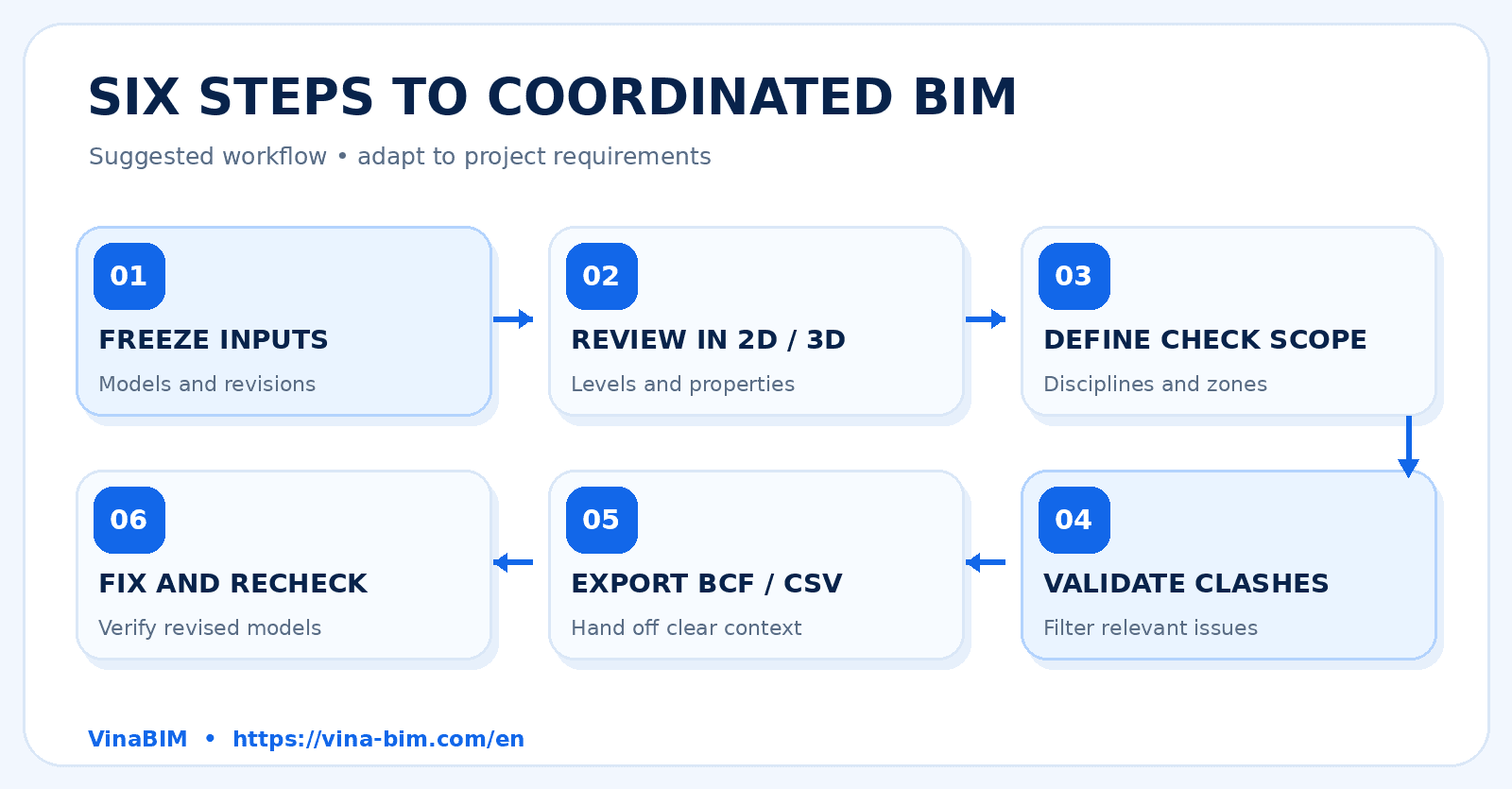
The six-step BIM model coordination workflow
1. Lock the model set and revision baseline
Collect architectural, structural, and MEP models against the same release milestone. Record file names, disciplines, export dates, levels, zones, and coordinate systems. Mixing revisions can inflate the clash list without reflecting current design intent.
2. Inspect spatial alignment in 2D and 3D
Load suitable model formats and check coordinates, levels, and relevant areas. Use plans, sections, section boxes, and element properties to understand geometry before classifying a potential clash.
3. Define discipline pairs and check scope
Prioritize interfaces such as MEP versus structure or densely routed services. Establish exclusions, approved penetrations, and any project-defined clearance criteria. Avoid treating every intersection as a defect.
4. Run clash checks, then validate the results
Automated checks produce candidates for investigation. Review each relevant result through viewpoints, sections, properties, and design documentation. Separate actual issues from acceptable conditions and items needing clarification.
5. Record and communicate issues through BCF/CSV
Capture a clear description, location, owner, priority, and follow-up milestone. BCF carries model-based issue context; CSV can support structured issue registers. BCF does not contain a replacement copy of all model geometry.
6. Author the correction and verify the new model
Design authors update geometry in an appropriate authoring application and release a revised model. Run the relevant coordination checks again and close an issue only after its resolution has been verified on the updated files.
Diagram 1: From model input to verified checks
The six-step visual shows a suggested sequence. Teams can repeat the scoping and validation stages to focus on high-risk areas rather than treating the whole project as one indiscriminate check.
Match BIM software to the job, not the label
The phrase “BIM software” may refer to authoring, viewing, coordination, or issue management. Define the required output first: inspect a model, identify clashes, communicate issues, or change design geometry.
| Task | Tool category | VinaBIM role |
|---|---|---|
| Inspect models and properties | BIM viewer / model reviewer | Supported: 2D/3D, Properties, Section Box |
| Identify geometric conflicts | Coordination / clash checking | Supported: clash checking on stated formats |
| Share issue registers | BCF or tabular issue exchange | Supported: BCF and CSV export |
| Modify design geometry | BIM authoring software | Not a replacement for advanced authoring |
Where VinaBIM fits into the workflow
According to information supplied by a VinaBIM representative, the software opens RVT/RFA/RTE, IFC, and NWD/NWC models; supports 2D/3D viewing, plans, elevations, sections, Properties, Visibility/Graphics, and Section Box; and provides clash checking for the stated model formats with BCF/CSV export.
In this workflow, VinaBIM is positioned for model review, clash checking, and issue exchange, not as a full advanced BIM-authoring replacement. Geometry changes still belong in the appropriate design authoring environment.
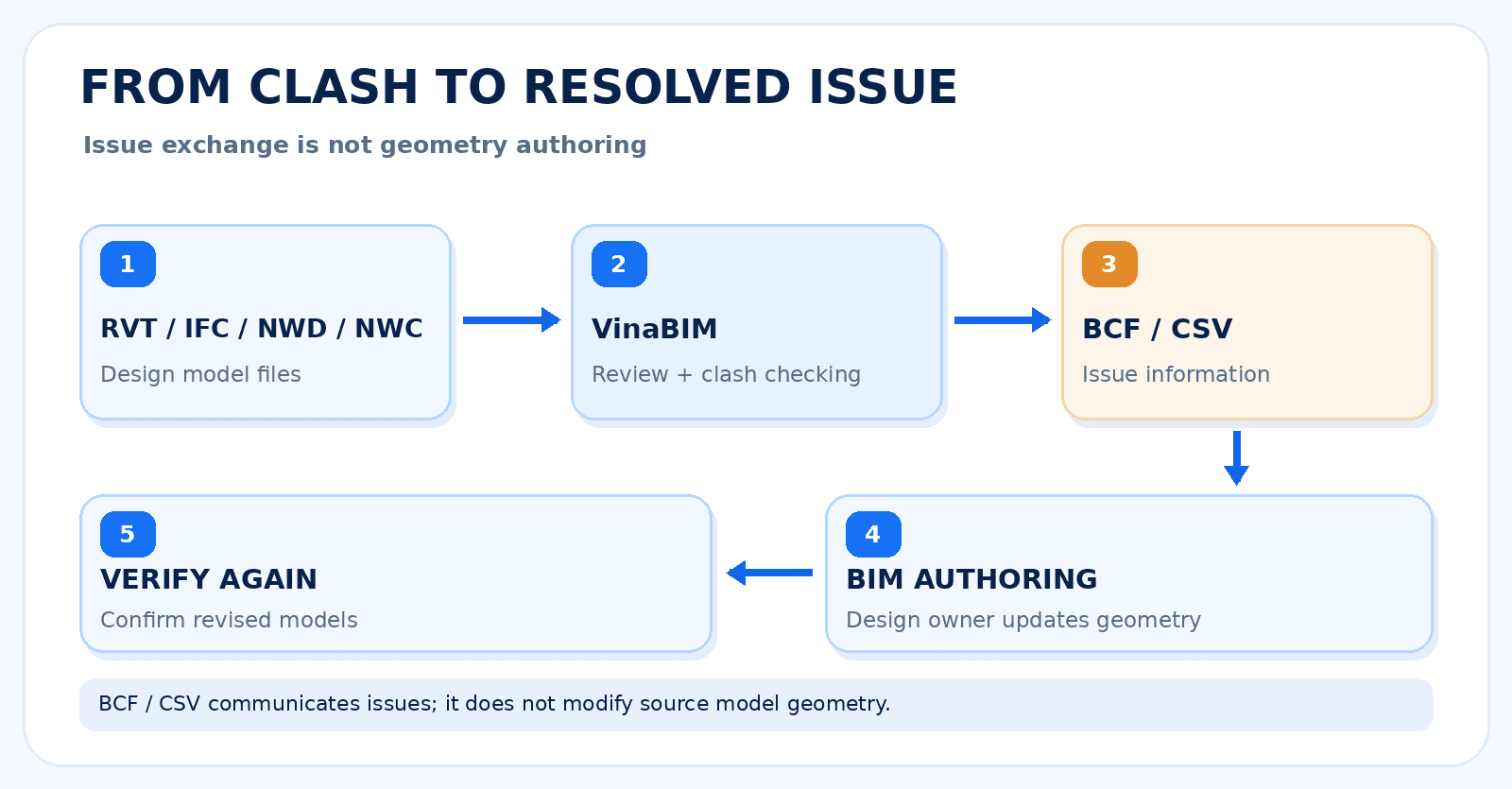
Diagram 2: From a clash to a corrected model
This flow makes the handoff explicit: exporting BCF/CSV communicates a model issue; it does not edit the source RVT/IFC geometry.
BIM coordination meeting checklist
- Confirm file names, revisions, disciplines, and shared coordinates.
- Agree on priority zones and model pairs before the meeting.
- Triage results into real issues, accepted interfaces, or items needing review.
- Assign every actionable issue an owner, context, and review date.
- Recheck released updated models before marking issues resolved.
Common pitfalls: checking misaligned revisions, assigning all clashes to one owner, closing issues without rerunning checks, or assuming that a BCF file is a full BIM model.
Conclusion
Effective BIM coordination does not end when someone clicks “Run Clash.” The practical value comes from choosing the right models, filtering meaningful issues, assigning context-rich actions, and verifying the revised model.
For teams that need cross-format viewing, clash review, and BCF/CSV handoff, VinaBIM is an option to evaluate in that workflow. Validate it against your project models and delivery requirements before adoption.
Explore BIM model reviews with VinaBIM
Learn about model viewing, clash review, and structured issue exchange for your team.
FAQ — Frequently asked questions
Does clash detection automatically fix the model?
No. A clash check identifies intersections or conflicts for review. Design owners decide how to resolve them and make geometry changes in suitable authoring software.
Does a BCF file contain the full RVT or IFC model?
No. BCF primarily communicates an issue, model viewpoint, and references; it is not a substitute for the full model file.
Should teams recheck models after a fix is reported?
Yes. Review the newly released models, rerun relevant checks, and confirm the change before closing an issue.
Which model formats does VinaBIM cover here?
VinaBIM representative: RVT, RFA, RTE, IFC, NWD, and NWC, plus clash checking and BCF/CSV export.